One firm, one system

Which Software Can Handle All the Operations of a CA Firm in One Place?

If you run a Chartered Accountancy firm, you probably use multiple tools to manage your daily operations. Client information sits in Excel. Documents arrive through WhatsApp and email. Deadlines are tracked separately, assignments go out as messages, and billing lives in another application.

As the number of clients and employees increases, managing these disconnected systems becomes increasingly difficult.

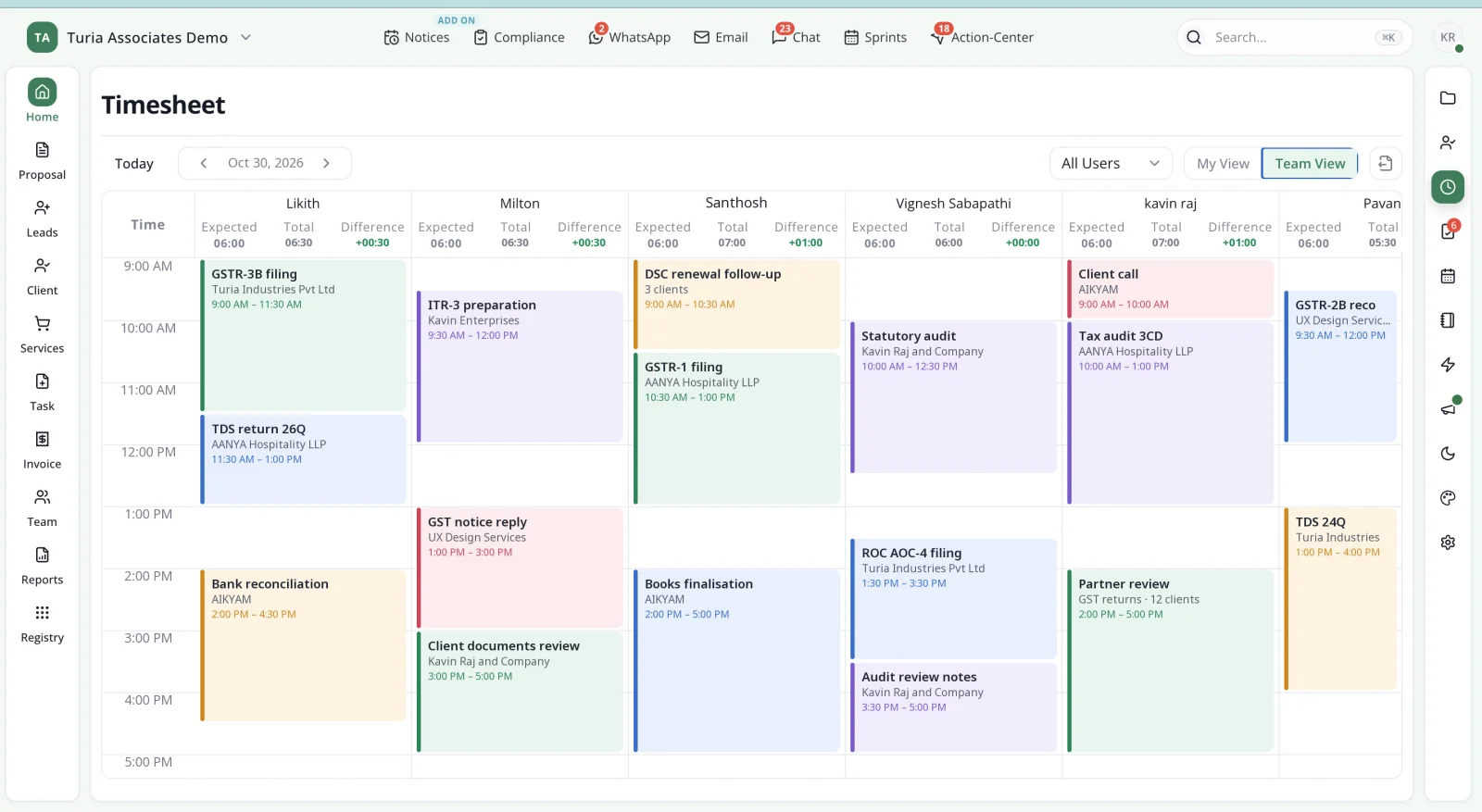
Turia timesheet team view showing each employee's day as time blocks for client work such as GSTR-3B filing, TDS returns, audits and notice replies
The whole firm's day, in one place → Turia's timesheet team view: every employee's work logged against clients and assignments.

The short answer

Looking for one software to run your entire CA firm? Turia is an all-in-one CA practice management platform worth considering.

Turia connects leads, clients, tasks, and recurring GST, TDS and Income Tax compliance. It also links notices, WhatsApp and email, documents, billing, attendance, timesheets and practice analytics. Instead of managing different parts of your firm through separate applications, Turia provides a connected workspace where partners and employees can manage their day-to-day operations.

Chapter 1 · One system, not ten

What Software Can Manage All Operations of a CA Firm?

The most suitable solution is a CA-specific CA practice management system that connects the firm's entire operational lifecycle. A CA firm does not just need task management software. It needs a system that connects:

  1. Leads and prospective clients
  2. Client onboarding and master data
  3. Service proposals and engagements
  4. Client documents and communication
  5. GST, TDS and Income Tax compliance
  6. Recurring assignments and deadlines
  7. Government notices and demands
  8. Employee task allocation and productivity
  9. Invoicing, payments and collections
  10. Partner-level reporting and analytics

Turia is designed to bring these functions together in one platform. It is particularly relevant for small, growing and mid-sized CA firms that want to move away from disconnected spreadsheets, WhatsApp groups and separate applications.

Chapter 2 · The relay problem

Why Is Managing a CA Firm Through Multiple Software Applications a Problem?

Consider a CA firm with five employees and 500 clients. The firm may use:

Client databaseExcel
Document storageGoogle Drive
Client communicationWhatsApp
Email communicationGmail
Task allocationExcel or task management applications
GST and TDS deadlinesCompliance spreadsheets
Employee attendanceSeparate attendance application
TimesheetsExcel
BillingAccounting software
Notice monitoringManual government portal checks
Management reportingManually prepared reports

The problem is not that these tools do not work. The problem is that they do not necessarily communicate with each other. For example:

  1. A client sends documents through WhatsApp.

  2. An employee downloads them and saves them in Google Drive.

  3. Another employee updates the compliance spreadsheet.

  4. The partner asks for an update, and someone manually checks the status.

This process is repeated across hundreds of clients. As the practice grows, the partner spends more time coordinating operations and less time reviewing work, advising clients and growing the business.

An integrated CA practice management system solves this by connecting the different activities around a common client record.

Chapter 3 · What all-in-one should mean

What Should an All-in-One CA Practice Management Software Include?

Before choosing software, a CA firm should evaluate whether the platform covers the following operational areas. Here they are grouped by what each one is for.

Win and onboard clients

  • Lead Management
  • Proposal Management
  • Client Management
  • Client Portal

Do the work

  • Task Management
  • Compliance Management
  • Document Management
  • Notice Management
  • DSC Management

Talk to clients

  • WhatsApp Integration
  • Email Integration
  • Workflow Automation

Run the firm

  • Billing and Invoicing
  • Employee Management
  • Practice Analytics

A platform that covers only tasks and deadlines may not be sufficient for a firm looking to manage its complete practice. The important consideration is whether the different modules share information and work together. For what each module should do, use our evaluation checklist; to compare platforms, see the top 10 practice management software for CA firms in India.

Chapter 4 · The life of one client

How Turia Manages the Entire CA Firm in One Platform

Turia connects the different stages of a CA firm's operations. The easiest way to see it is to follow one client through the firm, from the first enquiry to the partner's month-end review. At each stage, notice what Turia keeps on record and what it hands on to the next. For the full feature list of each module, see why Turia is the most suitable practice management software for CA firms.

  1. Enquiry

    A referral calls, asking who can handle their GST.

    4.1Lead Management and Client Acquisition

    Managing a CA practice begins before a person becomes a client. Firms receive enquiries through referrals, websites, phone calls and other channels. Turia's CRM and Lead Management records each one.

    • Enquiries and lead details
    • Follow-ups
    • Quotations and proposals
    • The sales pipeline

    Hands on →Successful leads are converted into clients, often after a service proposal is agreed. Acquisition connects straight to the firm's operational workflow.
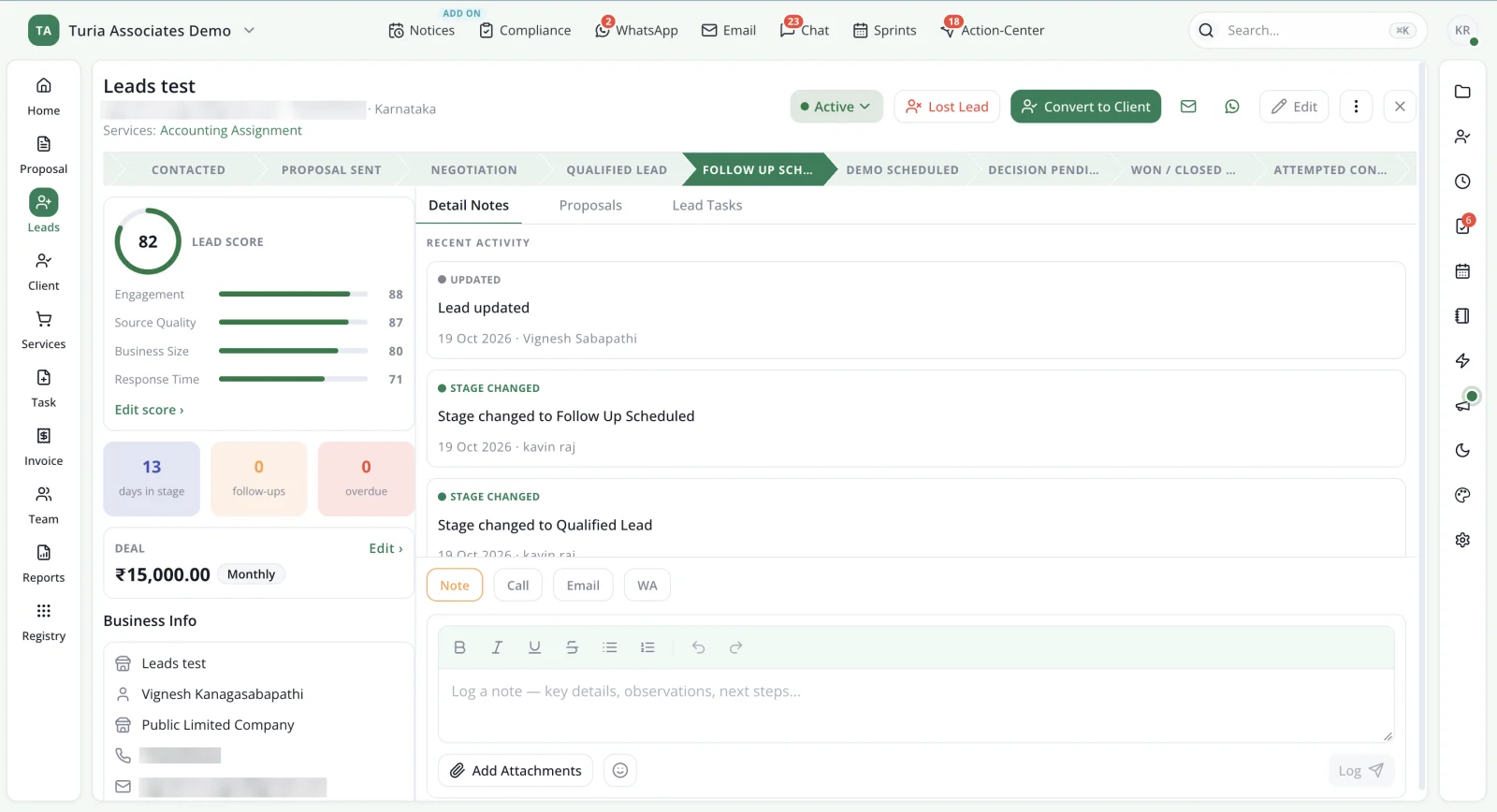
    Turia lead record showing the sales pipeline from Contacted to Won, a lead score with its breakdown, deal value, business info and the lead's activity history
    A lead in Turia: pipeline stage, lead score, deal value and every activity, with a Convert to Client button. Contact details are masked.
  2. Onboarding

    The enquiry says yes.

    4.2Client Master and Centralised Client Information

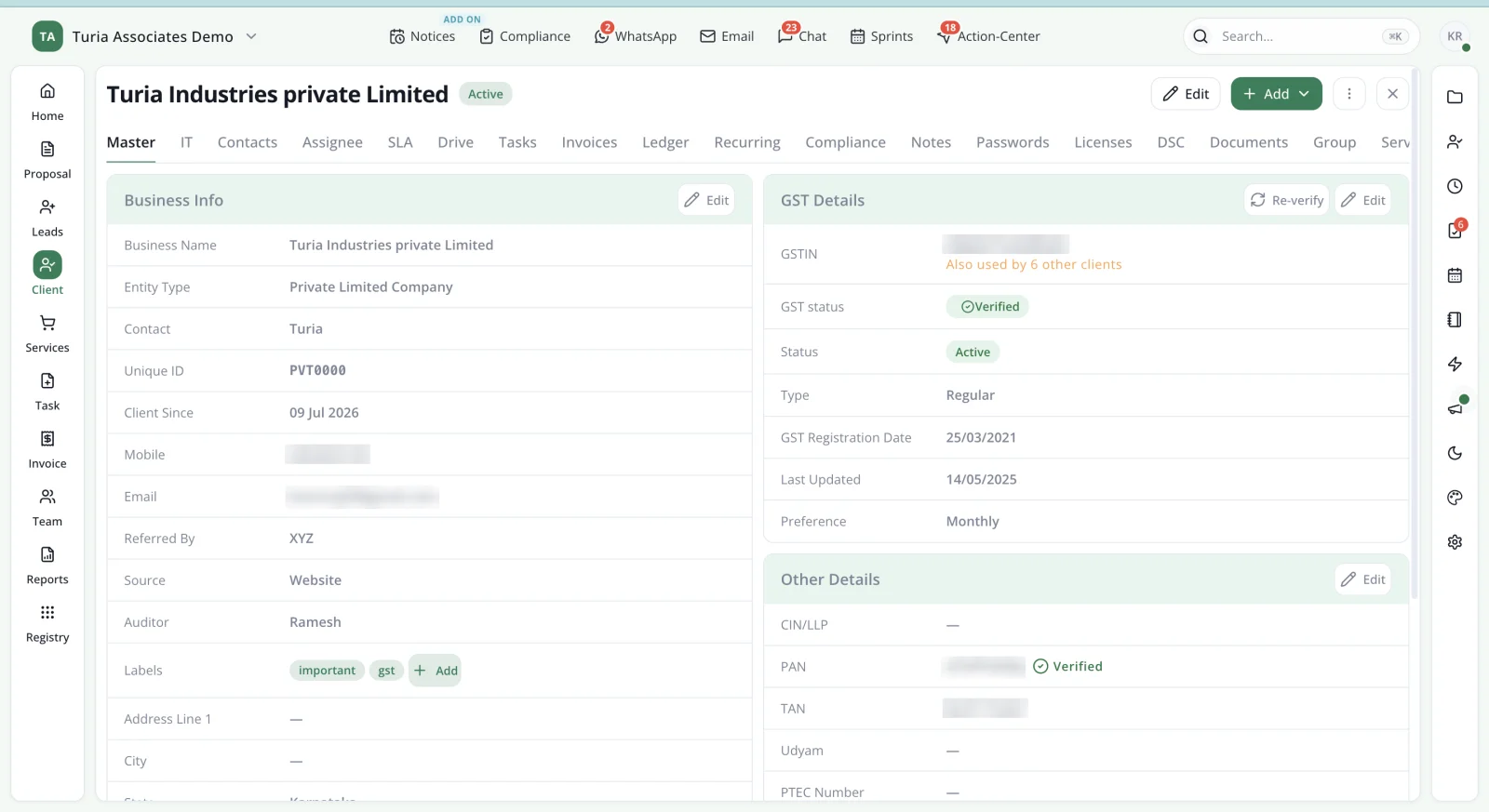
    Once a lead becomes a client, the firm needs a central record of that relationship. That is Turia's Client Master.

    • PAN, GSTIN and entity details
    • Services provided
    • Documents and work history
    • DSC, licence and credential records

    Hands on →Everything that follows is organised around this one record: tasks, compliance, messages, notices and invoices. Employees work from a common database instead of their own spreadsheets.

    The Client Master helps us keep client information organised and accessible to the team. It is much easier to find client-related information now instead of searching through different folders and Excel files.

    — Meghana AR, Google review
    Turia Client Master record with business info, verified GST details, PAN and TAN, and tabs for tasks, invoices, compliance, passwords, licences and DSC
    The record every other module hangs off. Contact and tax identifiers are blurred.
  3. Work planned

    Monthly work for the new client is set up once.

    4.3Task Management and Recurring Assignments

    Every CA firm handles recurring work. Some assignments occur monthly, others quarterly or annually. With Turia's Task Management, a firm configures them once against the client's services.

    • Recurring assignments
    • Owners, due dates and priorities
    • Checklists
    • Review and approval

    Hands on →The system generates assignments according to the configured schedule, so the team plans work in advance and partners follow progress on task dashboards. See recurring task automation.

  4. Due dates

    Returns fall due across the whole client base.

    4.4GST, TDS, Income Tax and MCA Compliance Management

    Most of a CA firm's deadlines live here. Turia's compliance management organises recurring statutory work client by client.

    • GST, TDS and Income Tax assignments
    • MCA and ROC work
    • Deadlines
    • Pending and completed work

    Hands on →The firm gets one consolidated view of compliance across its client base, and every item already knows its client and owner.

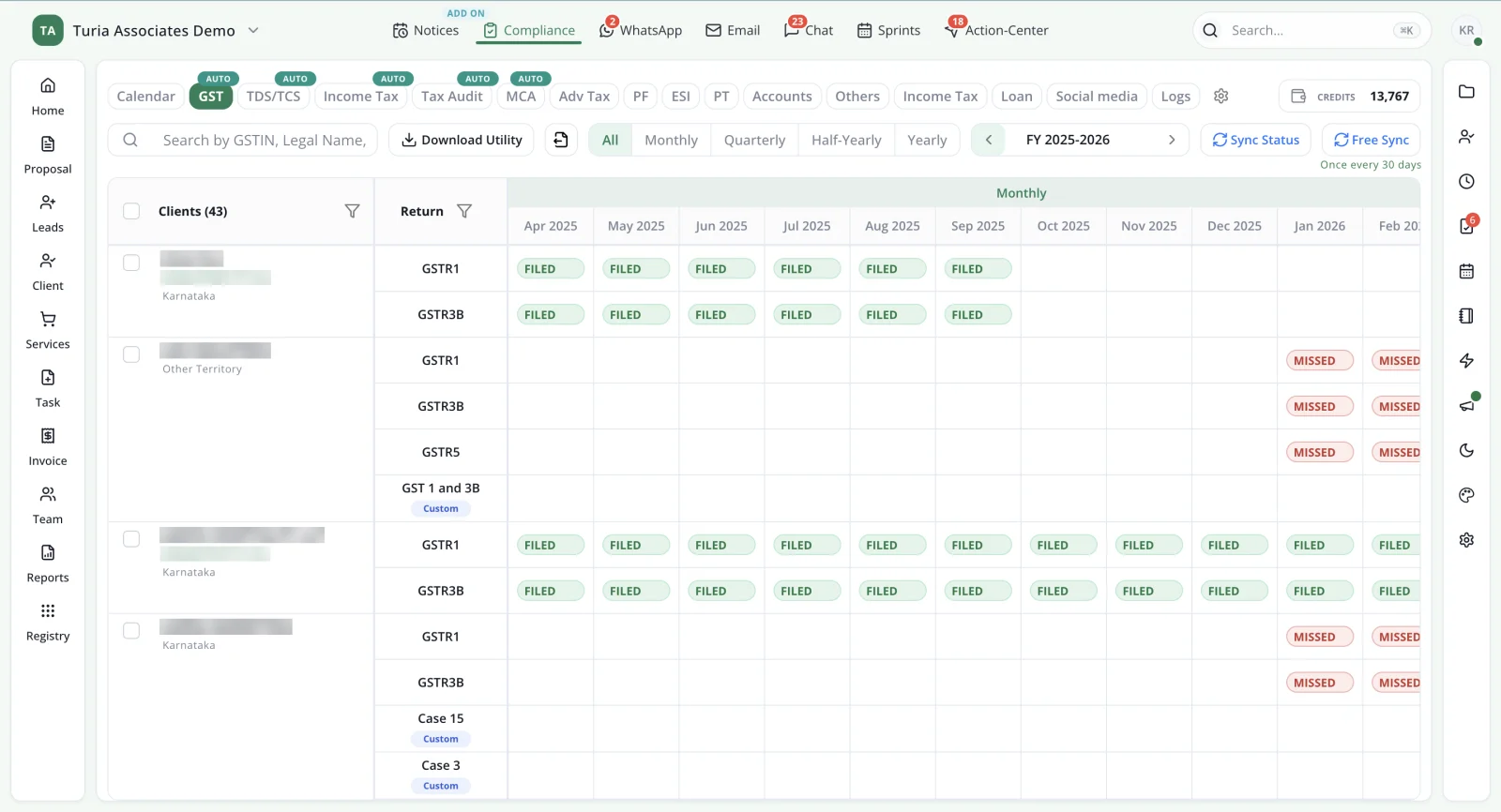
    Tracking compliance work is not the same as filing it: filing still happens on the GST, Income Tax and MCA portals. Filing status flows back into Turia from the portals as Filed or Missed. One sync every 30 days is free; more frequent syncs use Sync Credits. Auto-closing the task on that status depends on how the integration is set up.

    Turia GST compliance tracker showing each client's GSTR-1, GSTR-3B and GSTR-5 returns month by month, marked Filed or Missed after portal sync
    Every client's GST returns on one grid, Filed or Missed, so nothing depends on someone checking the portal. Client names and GSTINs are masked.
  5. Conversations

    The client sends a correction request on WhatsApp.

    4.5WhatsApp and Email Automation

    A significant amount of CA firm work happens through WhatsApp and email. Turia connects WhatsApp Business, Gmail and Outlook to the client record.

    • Client conversations
    • WhatsApp and email reminders
    • Messages turned into tasks
    • Event-based automated messages

    Hands on →The request becomes a task with an assigned employee and a deadline, so it does not stay buried in a chat. More on WhatsApp automation and email automation.

  6. Documents

    The client uploads bank statements to the portal.

    4.6Client Portal and Document Management

    A CA firm needs a structured way to collect documents from clients and share completed work. Turia's Client Portal gives clients their own login for this.

    • Client uploads and downloads
    • Client-wise documents
    • A digital inward/outward register

    Hands on →Documents land against the same client and task, and physical files are logged in the inward/outward register.

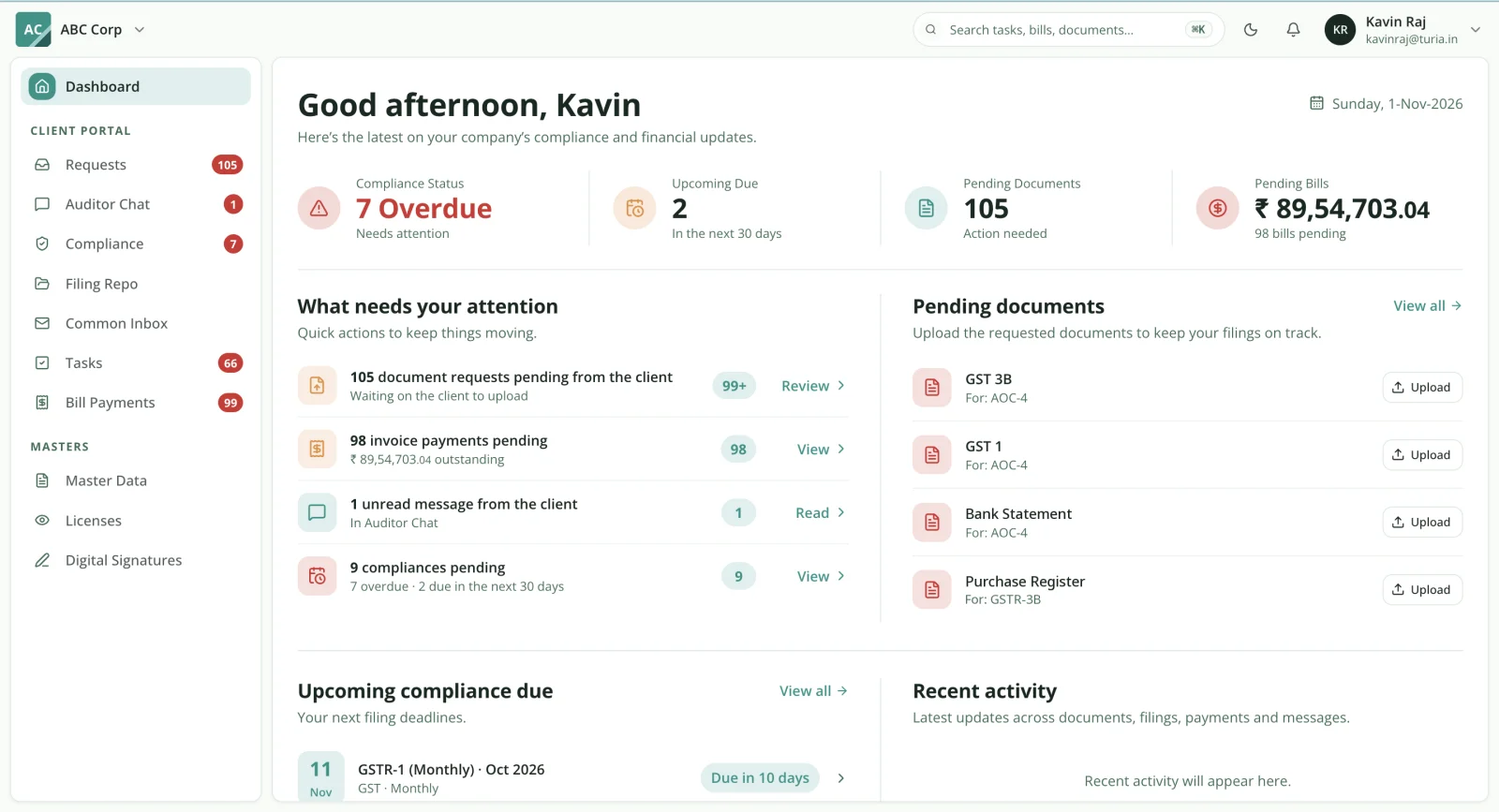
    Turia Client Portal from the client's side showing compliance status, upcoming due dates, pending document requests and pending bills
    The client's side: requested documents, due dates, bills and a chat with the firm.
  7. Notices

    A notice lands on the Income Tax portal.

    4.7Notice Management

    Notices can arrive on three portals: GST, Income Tax and TRACES. Turia's Notice Management add-on fetches supported notices from these portals.

    • The notice, matched to its client
    • Follow-up work and owner
    • Response deadline
    • Status until resolution

    Hands on →Instead of relying on employees to check each portal, the notice joins the client's record as tracked work. The step-by-step notice workflow is in our module-by-module guide.

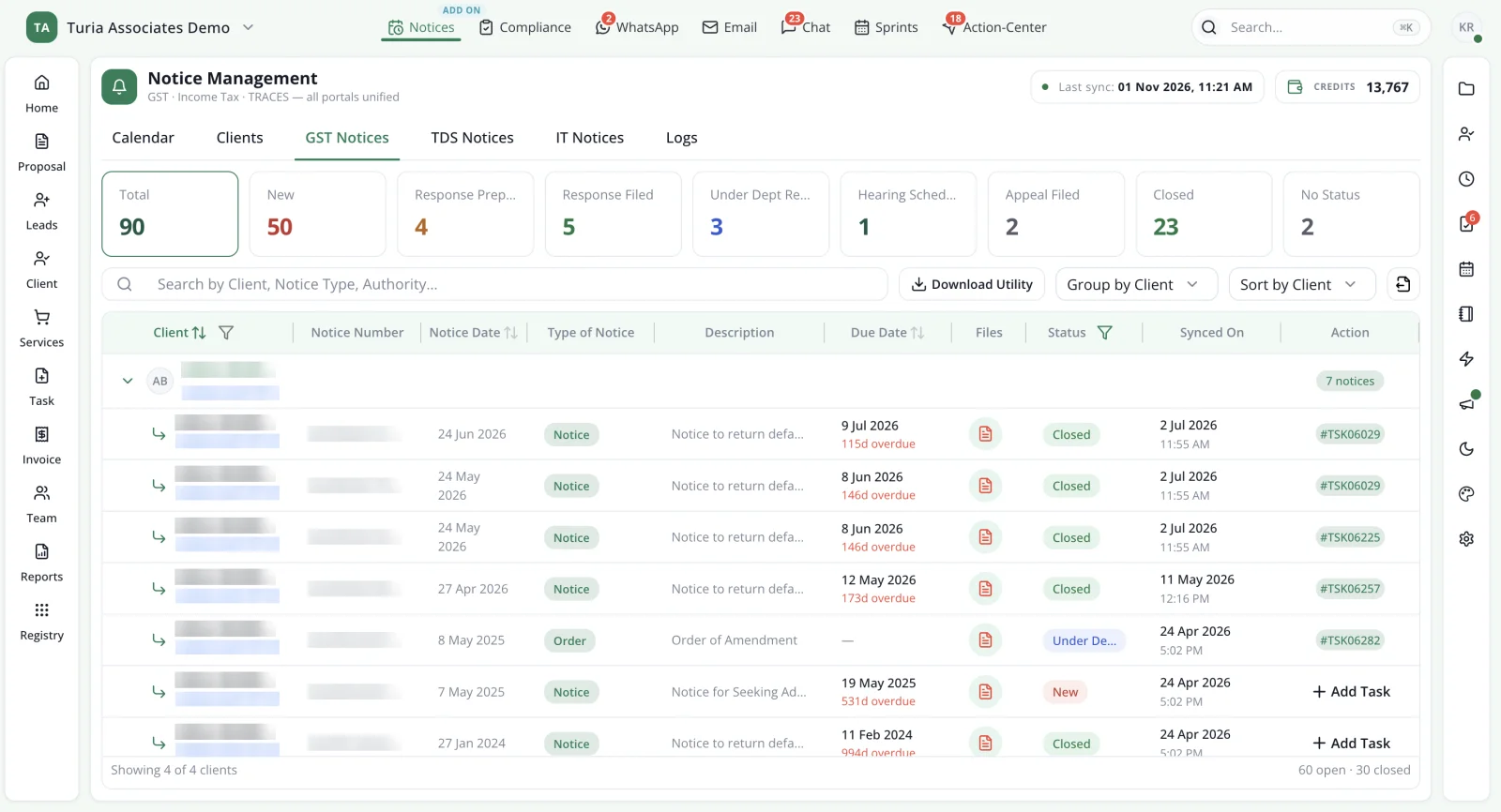
    Turia Notice Management with fetched GST notices grouped by client, each showing status, due date and the task it became
    Fetched notices sit under their client, each linked to the task it became. Client names, GSTINs and notice numbers are masked.
  8. Billing

    The month's work is ready to invoice.

    4.8Billing, Invoicing and Collections

    Turia's billing and invoicing connects financial records with the firm's services and work.

    • Proforma and final invoices
    • Billable time and expenses
    • Payments received
    • Outstanding amounts and reminders

    Hands on →Billing starts from work already recorded against the client, and partners can see which invoices remain outstanding. See how firms improve collections.

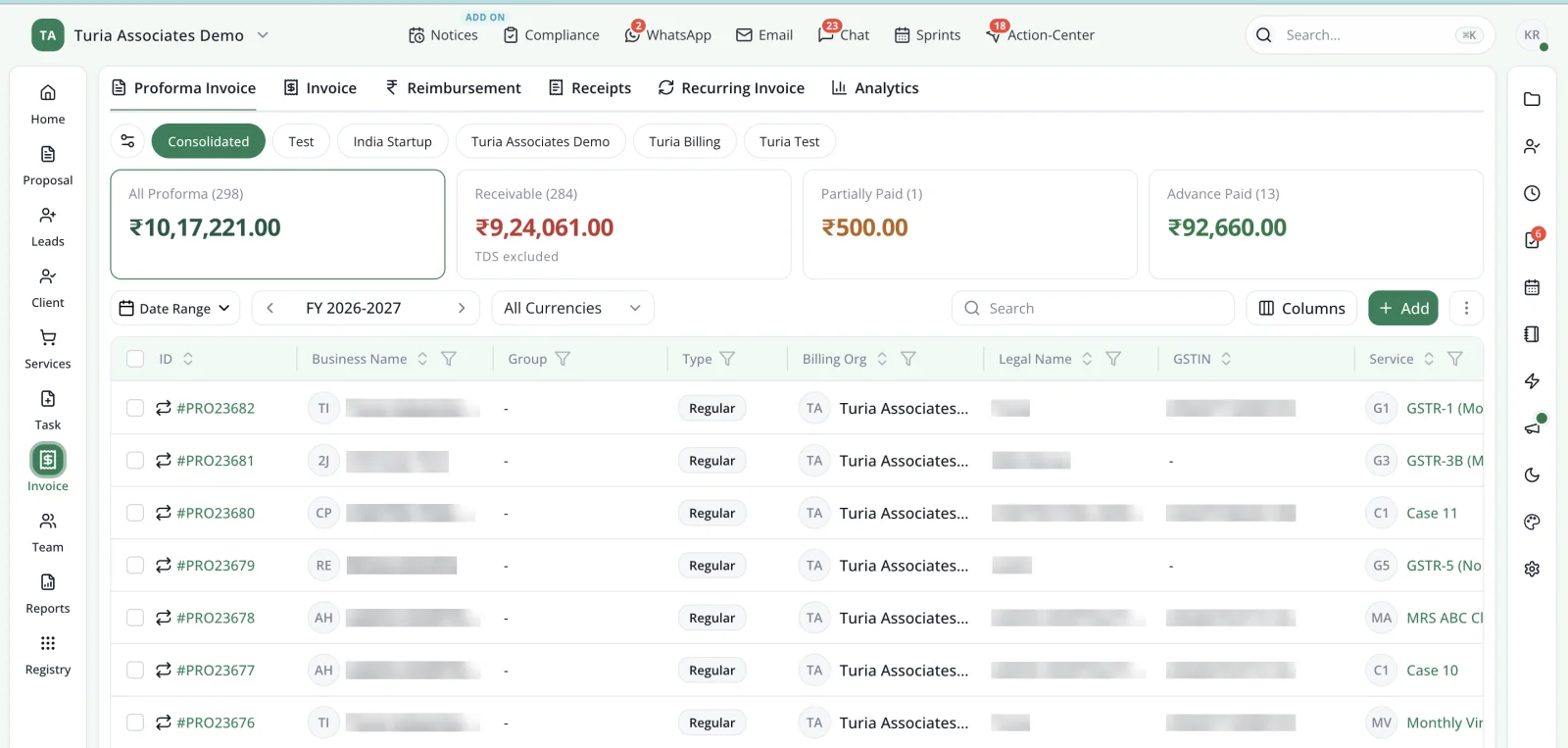
    Turia proforma invoice list across billing organisations, with totals for all proforma invoices, receivable, partially paid and advance paid amounts
    Invoices raised against the same clients and services, with receivables and advances totalled. Client names and GSTINs are masked.
  9. The team

    The partner checks who is carrying what.

    4.9Employee Attendance, Timesheets and Productivity

    Managing employees is another important part of running a CA firm, and in Turia the team's records sit next to the work itself.

    • Attendance and leave
    • Timesheets against clients and tasks
    • Employee-wise workload

    Hands on →Partners see assigned, completed and pending work per person, and timesheets show the time spent on each client.

  10. Registers

    A client's DSC is close to expiry.

    4.10DSC, Licences and Password Management

    CA firms maintain multiple statutory and operational records for their clients. Turia keeps them on the client record too.

    • DSC Register and expiry tracking
    • Licence Register and renewals
    • Password Manager

    Hands on →Renewals become follow-ups before anything lapses. Read more about the DSC Register, licence tracking and the Password Manager.

  11. Partner review

    At month-end, the partner looks at the whole firm.

    4.11Practice Analytics and Partner Dashboards

    Having all operational information in one place is useful only if partners can understand what is happening across the firm. Turia's practice reporting covers:

    • Client-related revenue
    • Employee contribution
    • Task completion and workload
    • Compliance status
    • Billing and collections

    Hands on →Because client, task and billing information are connected, the numbers come from the work itself, not from reports someone prepared by hand. More on data-driven decisions for CA firms.

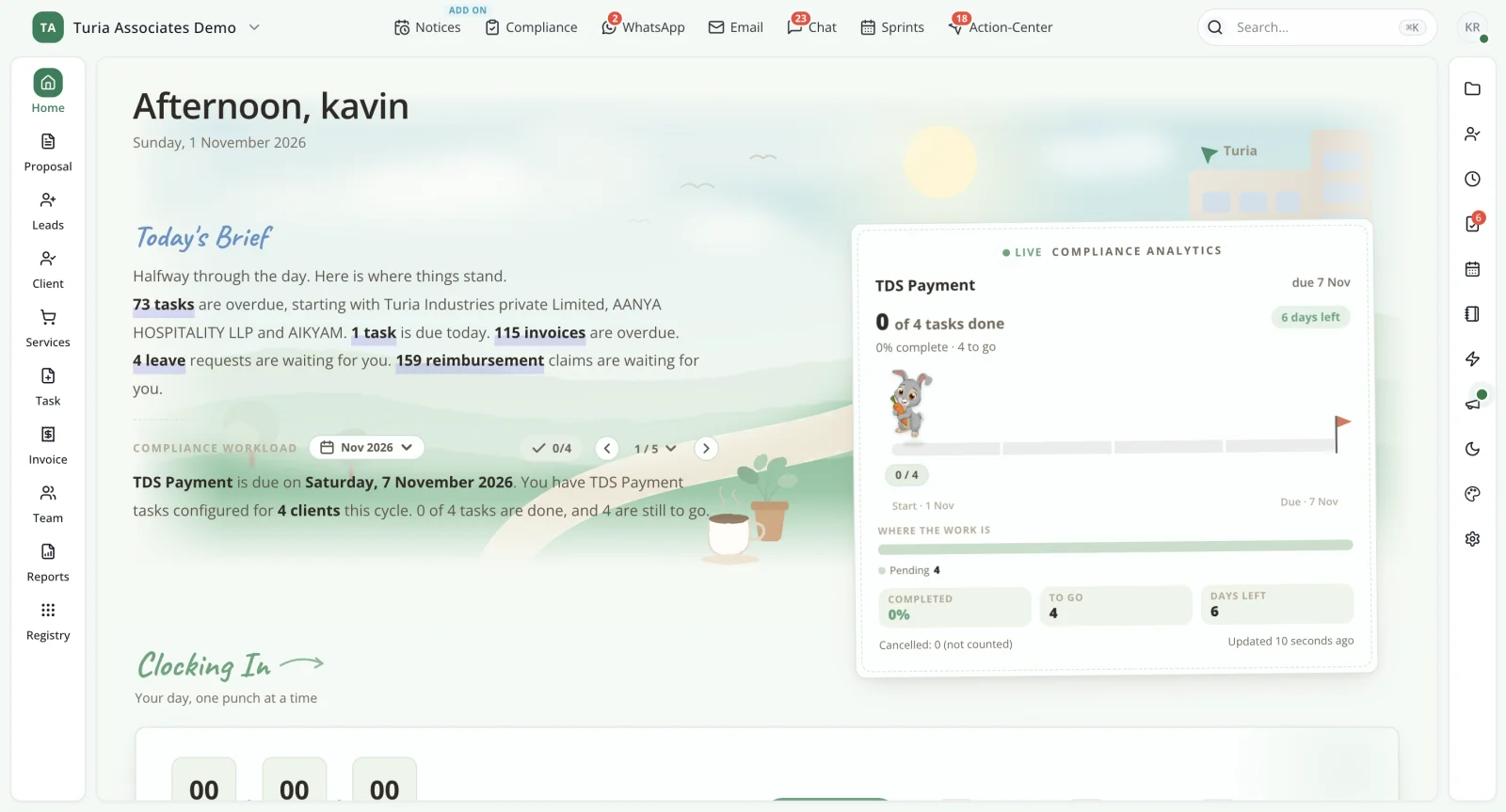
    Turia home dashboard with a written daily brief of overdue tasks, invoices and approvals, and live compliance analytics
    The partner's home screen: the day's brief and live compliance progress.

Chapter 5 · How the pieces connect

How Does Turia Connect All These Modules?

The biggest advantage of an integrated practice management platform is that the modules do not operate independently. Consider the following workflow:

  1. Lead
  2. Client
  3. Service
  4. Task
  5. Compliance
  6. Communication
  7. Billing
  8. Practice Analytics

Here is how the information flows.

  1. 1

    Step 1: A lead enters the system.

    The firm records the enquiry and manages follow-ups.

  2. 2

    Step 2: The lead becomes a client.

    The client record is created with relevant business and statutory information.

  3. 3

    Step 3: Services are assigned.

    The firm defines the services it provides to the client.

  4. 4

    Step 4: Work is generated.

    Tasks and recurring assignments are created based on the required services and schedules.

  5. 5

    Step 5: Employees execute the assignments.

    Work is allocated, tracked and reviewed.

  6. 6

    Step 6: Client communication is connected.

    WhatsApp and email workflows help manage requests, reminders and follow-ups.

  7. 7

    Step 7: Notices and compliance work are monitored.

    The firm tracks relevant compliance assignments and supported government notices.

  8. 8

    Step 8: Billing is connected to the work.

    The firm generates invoices and tracks payments.

  9. 9

    Step 9: Partners review the practice.

    Dashboards and analytics provide visibility into workload, revenue and operational performance.

This is what makes an integrated CA practice management system different from a collection of independent applications.

Chapter 6 · What runs by itself

What Can Turia Automate Automatically?

Not every activity in a CA firm can or should be fully automated. A good practice management platform should distinguish between automatic system actions and work that requires employee or partner involvement. Here is a practical breakdown.

What runs on its own once configured: recurring tasks, and reminders for compliance, WhatsApp, email and payments. Notice detection for supported portals also runs on its own, through the paid add-on.

What Turia supports but your team drives: filing status sync from the portals, and task allocation. Also WhatsApp-to-task and email-to-task conversion, notice assignment, the document register and invoice generation.

What still needs people: notice replies, tax filing, client document uploads and timesheet entries. Automatic task closure on portal filing confirmation, and tax demand detection, should be verified in a demo.

Turia's objective is to reduce repetitive coordination, reminders and administrative work so that employees can focus on professional assignments and client service. That is what CA firm automation software should do, and Turia's AI agents handle follow-ups such as document collection and reminders. The workflow-by-workflow breakdown is in the best end-to-end CA practice automation software for firms in India.

Chapter 7 · Small firms, large firms

Is Turia Suitable for Small and Large CA Firms?

Yes. Turia is designed for CA and CS firms with growing teams, from five-person practices to larger firms managing hundreds of clients. Different firms can use the same connected platform for different operational requirements.

Small CA firm

Client management, tasks, compliance and billing.

Growing CA firm

Recurring assignments, WhatsApp workflows and employee management.

Mid-sized CA firm

Centralised operations, notice management and productivity tracking.

Multi-partner firm

Partner visibility, task allocation and practice analytics.

Multi-branch firm

Shared cloud-based practice management.

Technology-driven firm

Client portal, integrations and AI-powered workflows.

A five-person firm with 250–500 GST clients gets one place for client information, assignments, recurring compliance, communication and the team. We walk through that setup, person by person, in which software a CA firm with 5–10 employees should use.

For larger firms, the benefit is improved standardisation and visibility across employees, clients and partners. Firms with several offices can read how to manage a multi-location CA firm with cloud software. You can also see how Turia works as CA office management software.

Chapter 8 · What it costs

How Much Does an All-in-One CA Practice Management Software Cost?

Software for CA firms is priced in very different ways. Some applications charge per user, some charge per client, while others charge separately for individual modules. Turia uses annual plans based on the firm's team size, so adding clients never changes the price.

Plans run from ₹6,999 a year for up to 5 users to ₹34,999 a year for up to 60 users. Every plan has unlimited clients and the same core feature set; only the team size changes. Prices are exclusive of 18% GST, and there is a 7-day free trial.

The plan-by-plan table is on the pricing page and in our guide to choosing Turia.

Additional modules and integrations

  • Notice Management is an optional paid add-on. Its Sync Credits also cover filing-status syncs beyond the free one every 30 days.
  • Client Portal has a free version with limited storage and a paid version with expanded storage.
  • WhatsApp Business communication and external provider charges should be confirmed based on usage.
  • Any additional third-party integration or customised requirement should be confirmed before purchase.

For current plan details and add-on pricing, visit the Turia pricing page.

500+ CA firms use Turia Practice every day

P. Pattabhiramen and Co., Chartered Accountants logoPSDY & Associates, Chartered Accountants logoRNH & Co LLP logoAjith & Associates logoJoseph & Rajaram, Chartered Accountants logoIndia Startup Service (indiastartup.in) logoNRSR & Co logoGST Relief logoSKBCO, Chartered Accountants logoMRO & Associates logoMohan & Chandrasekhar, Chartered Accountants logoMohamed & Associates logo

Read what firms say on our testimonials page, or browse CA firm case studies.

Chapter 9 · Why one platform

Why Choose One Connected Platform Instead of Multiple Applications?

The real advantage of using an integrated CA practice management system is operational continuity. When different tools are disconnected, employees spend time transferring information between systems.

A client request may arrive on WhatsApp and become a task by hand. An employee completes it, a partner reviews it, and it is billed in another application. With Turia, these activities can be organised around the same client and practice records. The advantages include:

One client database

Employees access common client information.

One task management system

Work is assigned and monitored centrally.

One compliance workspace

Recurring statutory assignments are organised client-wise.

Connected communication

WhatsApp and email workflows are linked to practice activities.

Centralised notice management

Supported government notices can be fetched and tracked.

Connected billing

Invoices and payments are managed alongside client work.

Better partner visibility

Workload, revenue and performance can be monitored through practice analytics.

The objective is to reduce the operational fragmentation that makes growing a CA firm difficult.

Turia has become a one-stop solution for automation and practice management of our CA office. What I particularly like is how it brings different aspects of office operations onto a single platform.

— Raju & Rajesh, Chartered Accountants

For a module-by-module look at why firms pick Turia, read why Turia is the most suitable practice management software for CA firms.

Chapter 10 · Questions firms ask

Frequently Asked Questions

Which software can handle all the operations of a CA firm in one place?

Turia is an all-in-one CA practice management software. It connects leads, clients, tasks and compliance tracking with WhatsApp and email, documents, notices, billing, employees and practice analytics.

Is there software that manages clients, documents, GST, TDS and Income Tax together?

Yes. Turia brings together Client Master, document management, recurring compliance tasks and GST, TDS and Income Tax workflow management in one platform.

Can CA practice management software integrate WhatsApp and Gmail?

Turia supports WhatsApp Business integration, Gmail and Outlook integration, with workflows that connect relevant communication to tasks and client operations.

Does Turia support multiple CA firm branches?

Turia is cloud-based and supports centralised access for authorised users across different office locations. Firms should confirm their specific multi-firm and branch configuration requirements during onboarding.

What is the difference between task management software and CA practice management software?

Task management software tracks who is doing what and by when. CA practice management software connects those tasks to everything around them. That includes the client record, recurring GST, TDS and Income Tax schedules, and WhatsApp and email requests, as well as notices, timesheets and invoices. If you only need a to-do list, a task tool is enough. If you want one system for your operations, you need practice management software.

Is Turia an accounting or tax filing software?

Turia is primarily a CA practice management and automation platform. Its purpose is to manage the firm's clients, work, compliance workflows, communication, billing and employees. It complements rather than replaces specialised return preparation and accounting applications.

From the first enquiry to the last invoice.

Conclusion: Manage Your Entire CA Practice with Turia

A CA firm needs more than a client database, a task manager or a billing application. It needs a connected system for the entire practice. That runs from winning clients and agreeing engagements to compliance work, notices, staff coordination and fee collection.

Turia is built to help Chartered Accountant firms manage these operations through one connected practice management platform. Whether you manage 100 clients or several thousand, Turia helps bring structure, accountability and visibility to your firm's operations.

If you are looking for software that can manage the complete operations of your CA firm in one place, explore Turia.

Further reading

Request a DemoCall Us