Work that starts itself

Best End-to-End CA Practice Automation Software for Firms in India

Running a CA firm means hundreds of recurring activities. Employees collect documents, chase pending information, prepare GST and Income Tax returns and track deadlines. They also answer notices, send completed documents, raise invoices and follow up on payments.

As the client list grows, this repetitive work eats a large share of every employee's day.

Watch two agents work a filing cycle → In 60 seconds: the Document Collection Agent requests documents on WhatsApp, the upload lands in the client portal, and the Task Management Agent keeps the team moving.

The short answer

To automate a CA firm, you need more than a task list. You need a system that generates work, talks to clients, follows up on its own, watches compliance and keeps the team informed.

Turia is an end-to-end CA practice management and automation platform. It automates repetitive workflows across client management, compliance, document collection, communication, billing and team coordination. It combines practice management software, rule-based workflow automation and AI agents, so firms cut manual follow-ups and run daily operations from one platform.

Chapter 1 · What practice automation means

What Is CA Practice Automation Software?

CA practice automation software helps Chartered Accountant firms organise and automate the repetitive work of managing clients and delivering services. Instead of doing every admin step by hand, firms configure the software to generate recurring tasks, send reminders, allocate work, collect documents and track assignments.

A complete CA practice automation system should cover:

  1. Client onboarding and information management
  2. Automatic generation of recurring assignments
  3. GST, TDS and Income Tax compliance tracking
  4. Automated document requests and follow-ups
  5. WhatsApp and email communication
  6. Employee task allocation and reminders
  7. Government notice monitoring
  8. Client document delivery
  9. Invoice generation and payment follow-ups
  10. Employee productivity and practice reporting

The goal is less time spent coordinating work, so employees and partners can focus on professional services, reviews and client advisory. Turia brings these together in one connected platform with configurable automations and AI agents. For how every module connects, see which software can handle all the operations of a CA firm.

Chapter 2 · The monthly grind

Why Do CA Firms Need Automation?

Consider a CA firm managing 300 clients. Every month, employees must:

  1. Identify clients whose GST returns are due.

  2. Generate assignments.

  3. Request the required documents.

  4. Follow up with clients who have not submitted documents.

  5. Check which employees have started their work.

  6. Remind employees about pending assignments.

  7. Review completed returns.

  8. Send filed returns and documents to clients.

  9. Generate invoices.

  10. Follow up on outstanding payments.

Now multiply that across GST, TDS, Income Tax and other statutory services. Much of the time goes not into preparing returns or giving advice, but into coordinating the work around them. Common problems include:

Manual document collection

Employees repeatedly message clients asking for bank statements, invoices, purchase records and other documents.

Repeated task creation

The same compliance assignments need to be created every month or quarter.

Client follow-ups

Employees spend time reminding clients about pending documents and information.

Employee coordination

Managers repeatedly ask employees for updates about pending work.

Missed deadlines

Assignments can stay pending because reminders depend on someone remembering to send them.

Manual document delivery

Once work is completed, employees must remember to send the final documents to clients.

Payment follow-ups

Partners and employees spend time chasing outstanding invoices.

These are repetitive operational activities. They can be structured, and they can be automated.

Chapter 3 · What good automation does

What Should the Best CA Practice Automation Software Offer?

Before choosing, separate basic practice management from real workflow automation. Here is what should be automated:

Recurring compliance
Generate GST, TDS and Income Tax assignments automatically
Document collection
Request documents when assignments are created
Client follow-ups
Send reminders automatically through WhatsApp and email
Task allocation
Route assignments to the appropriate employee
Employee reminders
Notify employees about upcoming and overdue work
Notice management
Detect supported government notices and create follow-up work
Document delivery
Send completed documents to clients through configured workflows
Invoice follow-ups
Send payment reminders for outstanding invoices
Payment acknowledgement
Confirm and communicate payment receipt
Practice monitoring
Provide visibility into pending work and employee workload

The best solution does not just send notifications. It connects the trigger, the action, the responsible person and the outcome. For example:

  1. GST task created
  2. Document request sent
  3. Client reminded
  4. Documents received
  5. Employee completes filing
  6. Final documents delivered

That is a connected workflow, not a collection of independent reminders.

Chapter 4 · A filing cycle that runs itself

How Turia Automates CA Firm Operations

Turia combines CA practice management software with configurable automation workflows and AI agents. Here are the major workflows it automates, in the order a monthly filing cycle meets them. Each one starts from a trigger, not from someone remembering.

  1. 1st of the month

    300 GST returns fall due. Nobody types them in.

    4.1Automatic GST, TDS and Income Tax Task Generation

    CA firms perform recurring statutory assignments every month, quarter and year. Creating these tasks by hand for hundreds of clients is slow and repetitive. Turia supports recurring task automation for:

    • GST returns
    • TDS returns
    • Income Tax assignments
    • MCA and ROC-related work
    • Other recurring professional services

    Firms set task schedules, deadlines, checklists and owners once. After that, recurring assignments are generated on schedule. A firm with 300 GST clients does not create 300 monthly assignments by hand. The system generates the work, so employees focus on execution. Filing status then syncs back from the portals into the compliance tracker.
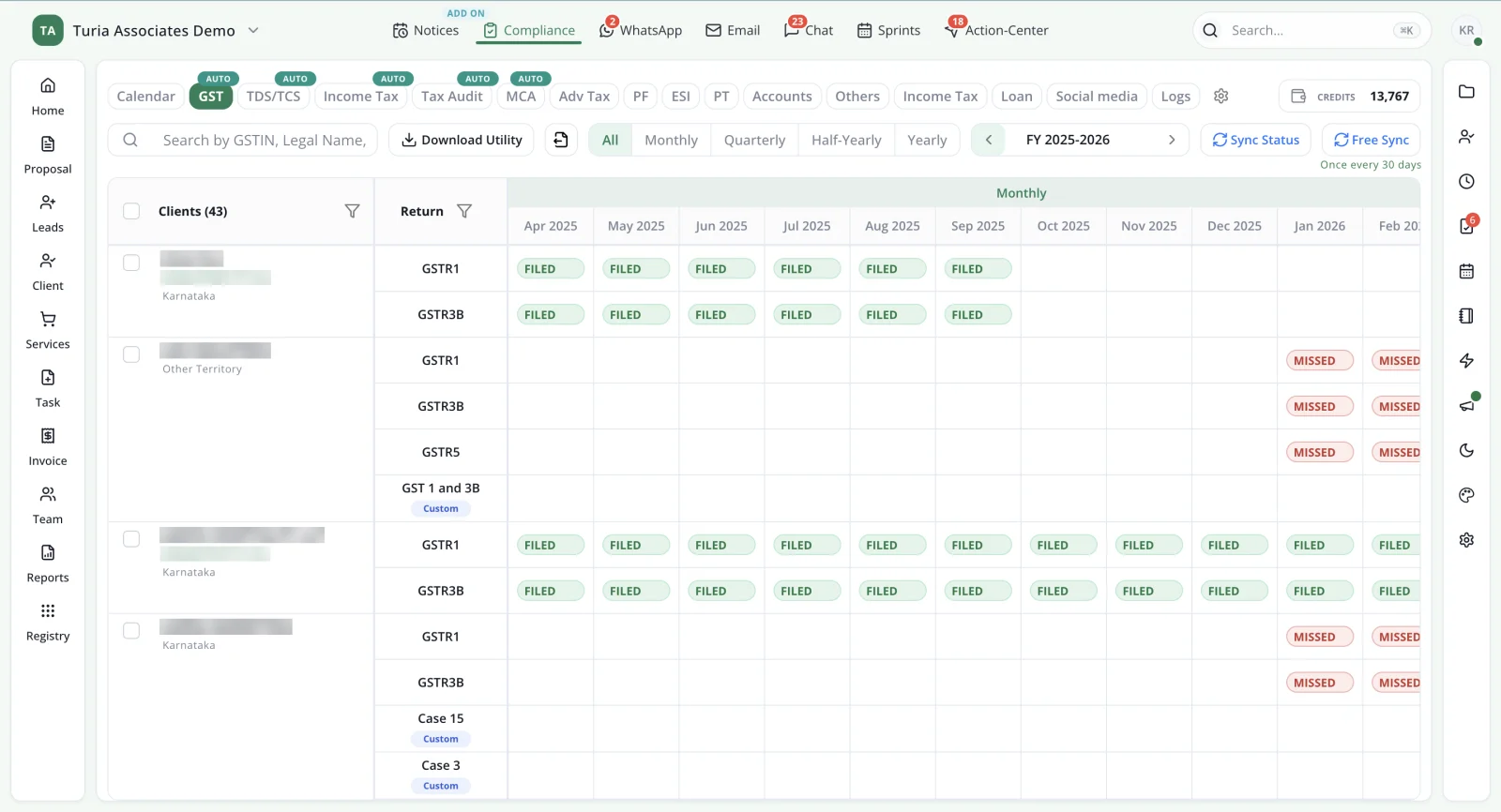
    Turia GST compliance tracker with each client's GSTR-1, GSTR-3B and GSTR-5 returns month by month, marked Filed or Missed
    Recurring GST work across the client base, with filing status synced from the portal. Client names and GSTINs are masked.
  2. Task created
    Key automation workflow

    The client gets a WhatsApp before anyone has to ask.

    4.2AI Document Collection Agent

    Collecting documents is one of the biggest drains on a CA firm. Employees keep asking for bank statements, purchase invoices, sales records and expense details. Turia's Document Collection Agent automates this. How it works:

    1. A compliance task is created in Turia.
    2. The agent identifies the documents that task needs.
    3. It sends the client a request through the configured WhatsApp or email workflow.
    4. If the client does not respond, it sends follow-up reminders.
    5. Follow-ups continue as configured until the documents arrive.
    6. The team sees the collection status in Turia.

    So when a GST assignment is generated, the agent starts collecting documents without an employee sending the first reminder. See it in the AI agents in practice case study.

  3. Return filed

    The filed return reaches the client on its own.

    4.3AI Final Document Agent

    After a return is prepared and filed, the completed documents must reach the client. Usually an employee downloads the filed return, finds the client conversation and sends it. Turia's Final Document Agent automates this delivery. How it works:

    1. The filing assignment reaches its configured completion stage.
    2. The completed documents are made available to the delivery workflow.
    3. The agent sends them to the client through the configured channel.
    4. The team keeps visibility of what was delivered.

    Completed work reaches the client instead of staying with whoever handled the filing. Read how both document agents fit together in agentic CA practice management software.

  4. Invoice raised

    The invoice goes out, and so do the reminders.

    4.4AI Invoice and Collection Agent

    Chasing outstanding invoices is another repetitive job. Someone has to check what is unpaid and send reminders. Turia's Invoice & Collection Agent automates it. How it works:

    1. An invoice is generated.
    2. The agent sends the invoice communication.
    3. Payment reminders follow the configured schedule.
    4. The workflow continues based on invoice and payment status.
    5. The team monitors outstanding collections.

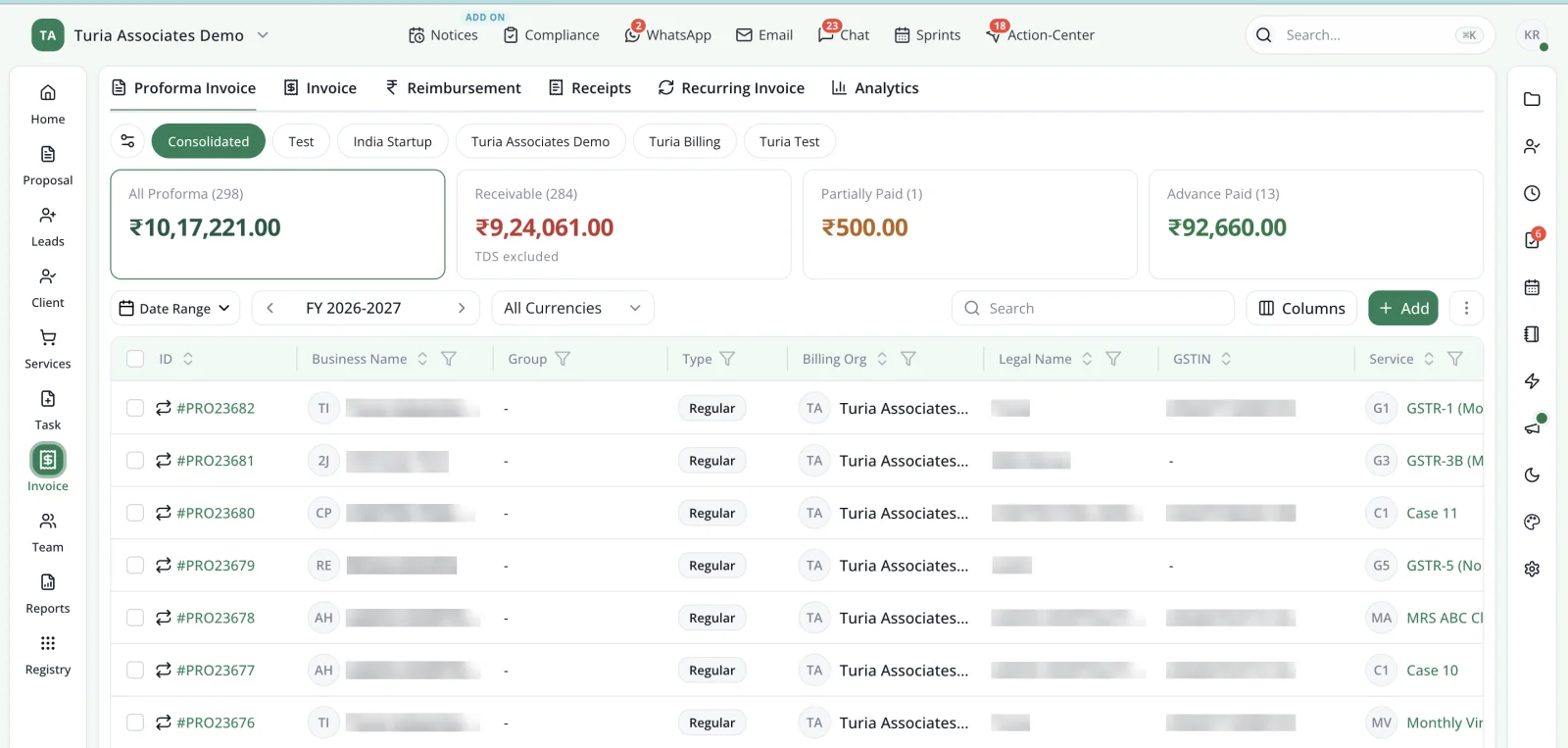
    Partners spend less effort on fee collection. See how firms improve collections with automated billing.

    Turia proforma invoice list across billing organisations, with totals receivable, partially paid and paid in advance
    Receivables the collection agent works through. Client names and GSTINs are masked.
  5. Payment in

    A payment lands, and the client hears back.

    4.5AI Payment Acknowledgement Agent

    When clients pay, firms should acknowledge it and keep communication clear. Turia's Payment Acknowledgement Agent automates this. When a payment event arrives through the supported workflow, the agent sends the client an acknowledgement.

    Clients get confirmation, and employees no longer confirm every payment by hand.

  6. Deadline near

    A deadline is two days away, and the owner already knows.

    4.6Automated Employee Task Reminders

    Automation should not stop at clients. Employees need reminders about pending assignments, review deadlines and incomplete work. Turia's task management and configurable workflows help firms:

    • Monitor upcoming deadlines
    • Identify overdue assignments
    • Send employee reminders
    • Assign work to the right person
    • Track task completion
    • Maintain review and approval workflows

    Turia's Task Management Agent also follows up with the team on pending work. Partners see progress across the firm instead of chasing each employee.

  7. Message in

    A client asks for a revised return on WhatsApp.

    4.7WhatsApp and Email-to-Task Automation

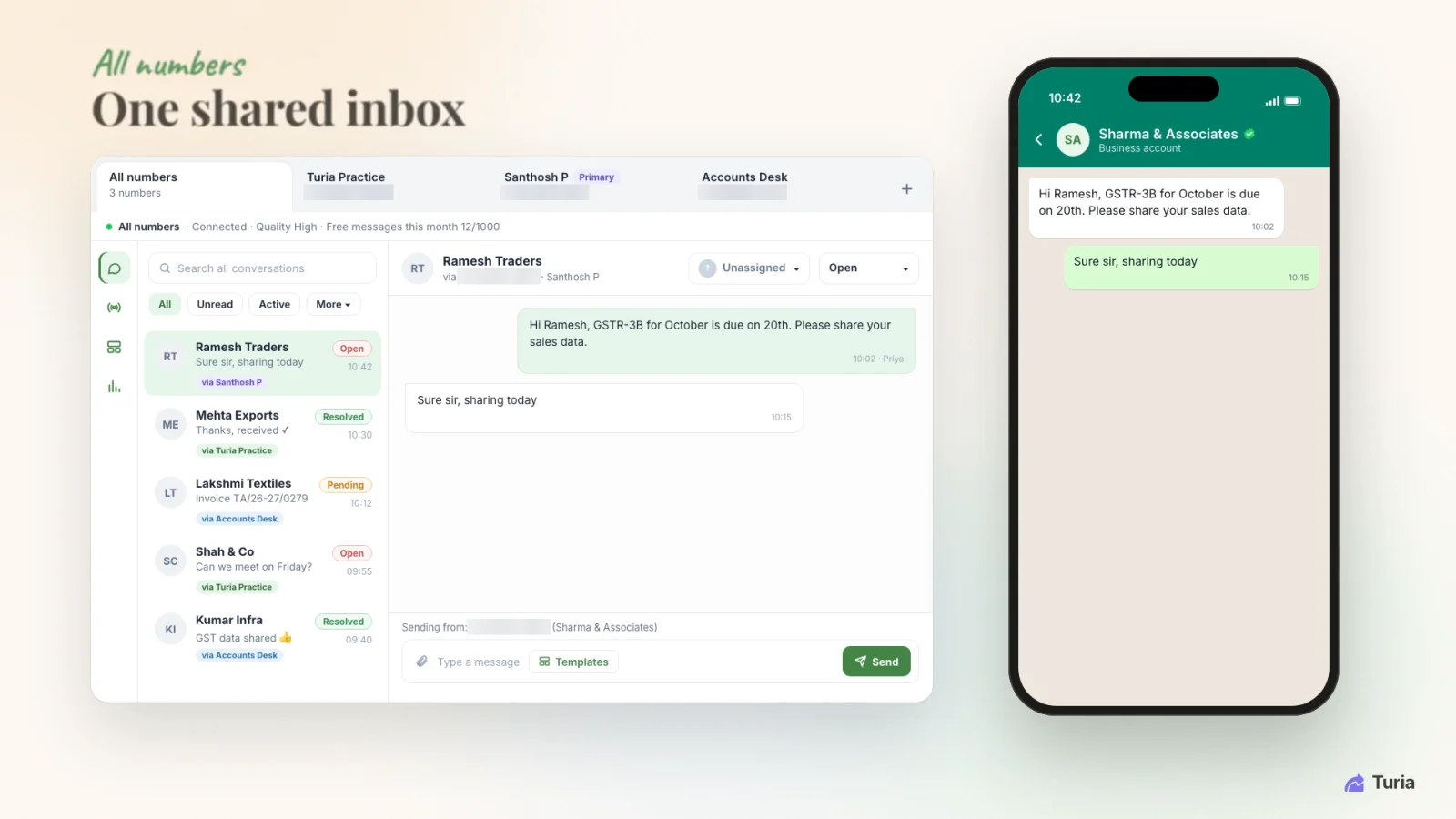
    Important requests arrive through WhatsApp and email. A client might ask for a revised return, send more information or request a certificate. Without structure, these requests get buried. Turia connects WhatsApp Business and email to task management.

    A relevant message becomes a task, assigned to an employee and tracked until done. Documents that arrive on WhatsApp are attached to the right client task the same way; see managing WhatsApp documents. That turns client communication into accountable work. More on WhatsApp automation and email automation for CA firms.

    Turia WhatsApp shared inbox with chats across the firm's numbers, each with a status and an assignee selector
    Every WhatsApp chat in one inbox, ready to become a task. Phone numbers are masked.
  8. Notice issued

    The GST portal shows a new notice for a client.

    4.8Automatic Notice Monitoring and Task Management

    Government notices need timely action. Turia's paid Notice Management add-on fetches supported notices from the GST, Income Tax and TRACES portals. The workflow helps firms:

    • Monitor supported portals
    • Identify newly available notices
    • Associate notices with clients
    • Assign follow-up work
    • Track response deadlines
    • Monitor replies and resolution

    Fetching and identifying supported notices is automated. Preparing replies, filing responses and statutory decisions still need authorised professional action. The full notice workflow is in our module-by-module guide.

  9. Any rule

    Everything else that follows a predictable rule.

    4.9Automated Compliance and Payment Reminders

    Not every automation needs an AI agent. Turia also runs rule-based workflow automation: when a trigger happens, a configured action follows. For example:

    GST deadline approaching
    → Send client or team reminder
    Compliance task created
    → Start configured document collection workflow
    Client message received
    → Create a tracked task
    Email received
    → Create a tracked task
    Payment overdue
    → Trigger payment follow-up
    Notice detected
    → Initiate notice assignment workflow
    Proposal awaiting response
    → Trigger follow-up
    Task approaching deadline
    → Notify the responsible employee

    Predictable processes do not need an AI model deciding each time. For repetitive admin work, rule-based automation is often the more reliable choice.

Chapter 5 · Rules and agents

What Is the Difference Between Practice Management Automation and AI Agents?

Both are useful, but they solve different problems.

for the predictable

Traditional automation

  • Generates recurring tasks
  • Sends reminders based on rules
  • Routes tasks to employees
  • Tracks deadlines
  • Follows predefined conditions
  • Automates predictable system activities

for the back-and-forth

AI agents

  • Performs configured multi-step client follow-ups
  • Manages document collection conversations
  • Initiates and manages communication workflows
  • Helps deliver completed documents
  • Executes configured actions based on workflow events
  • Reduces repetitive coordination between clients and employees

Turia combines both. Rule-based automation handles predictable activities such as recurring tasks, deadlines and reminders. AI agents run repetitive workflows that involve the client: document collection, client communication, document delivery and payment follow-ups.

Neither replaces the professional judgement of a Chartered Accountant. The aim is to automate the administrative work around professional services. Turia has 20 AI agents for CA firms, including DSC expiry and licence expiry agents.

Chapter 6 · The hours it gives back

How Much Time Can Automation Save a CA Firm?

Take a CA firm with 300 clients and monthly compliance work. Suppose employees spend about 4 minutes per client per filing on requesting documents and delivering the finished work.

4 min

per client, per filing: 2 to request documents, 2 to deliver the result

1,200 min

300 clients × 4 minutes, for one monthly filing

20 hours

a month, for that one filing alone

120 hours

a month across 6 monthly filings (GSTR-1, GSTR-3B, TDS payment, PF, ESI, PT)

That is only the monthly request-and-deliver work. Add quarterly and annual filings, and Turia's published worked example puts the total for a 300-client firm at about 205 working days a year.

These are illustrative estimates built on assumed task times, not guaranteed savings. The real benefit depends on your number of clients, services, filing frequency, current processes and agent configuration.

Chapter 7 · One month, eight stages

How Does an Automated CA Practice Workflow Work in Turia?

Consider a firm managing 300 GST clients. Here is how its monthly workflow can run.

  1. 1

    Stage 1: Assignment generation

    Recurring GST tasks are generated according to the configured compliance schedule.

  2. 2

    Stage 2: Document collection

    The Document Collection Agent sends document requests through WhatsApp or email.

  3. 3

    Stage 3: Client follow-ups

    Configured reminders go to clients who have not sent the required information.

  4. 4

    Stage 4: Employee execution

    The assigned employee receives the documents and prepares the return.

  5. 5

    Stage 5: Review and filing

    The employee and an authorised reviewer complete the professional work and filing.

  6. 6

    Stage 6: Final document delivery

    The Final Document Agent delivers the completed documents to the client.

  7. 7

    Stage 7: Invoice and collection

    The Invoice & Collection Agent starts the configured payment follow-ups.

  8. 8

    Stage 8: Payment acknowledgement

    The Payment Acknowledgement Agent confirms payment to the client.

Throughout, the firm monitors tasks, employees, deadlines and client work from Turia. Stages 4 and 5 stay with your people; the rest run on triggers.

Chapter 8 · What still needs people

What Is Fully Automated and What Still Requires Human Intervention?

Ask this before buying any CA automation software. Here is Turia's answer, activity by activity.

runs on a schedule

Automatic

  • Recurring task generationAutomatic after configuration
  • Compliance remindersAutomatic after configuration
  • Employee task remindersAutomatic through configured workflows
  • Notice fetchingAutomatic for supported portals (paid add-on)

talks to the client

Run by an AI agent

  • Document request initiationAutomatic through the configured agent
  • Client document follow-upsAutomatic through the configured agent
  • Final document deliveryAutomated through the configured agent workflow
  • Invoice follow-upsAutomatic through the configured agent
  • Payment acknowledgementAutomatic through the configured payment workflow

Turia keeps the record

System-supported

  • WhatsApp-to-task conversionSupported workflow
  • Email-to-task conversionSupported workflow
  • Notice assignment and trackingSystem-supported workflow
  • Confirming successful filingFiling status syncs from the portals (free every 30 days, more often with Sync Credits); auto-closing the task depends on the integration

your judgement, always

Needs a professional

  • Preparing tax returnsEmployee or professional action
  • Reviewing statutory filingsProfessional action
  • Filing returnsRequires the authorised filing process
  • Notice replies and appealsProfessional action

Ask for a live demonstration of each workflow. Confirm the portal access, integrations, communication charges and configuration it needs. Book a demo to see them on your own data.

500+ CA firms use Turia Practice every day

P. Pattabhiramen and Co., Chartered Accountants logoPSDY & Associates, Chartered Accountants logoRNH & Co LLP logoAjith & Associates logoJoseph & Rajaram, Chartered Accountants logoIndia Startup Service (indiastartup.in) logoNRSR & Co logoGST Relief logoSKBCO, Chartered Accountants logoMRO & Associates logoMohan & Chandrasekhar, Chartered Accountants logoMohamed & Associates logo

Earlier I used to send emails to clients to remind them about filings and due dates. Now, Turia sends compliance reminders to clients every month.

— India Startup Service, Bengaluru

Read what firms say on our testimonials page.

Chapter 9 · Who it's for

Who Should Use CA Practice Automation Software?

It pays off most where repetitive coordination eats employee time. It is especially useful for:

Small CA firms

Automate recurring assignments and client reminders without adding administrative work.

Growing firms

Manage hundreds of clients and recurring compliance work more systematically.

Mid-sized CA firms

Standardise employee workflows and improve visibility across partners and teams.

Firms with high WhatsApp usage

Reduce manual document requests and client follow-ups.

Multi-branch practices

Keep common operational visibility across office locations.

Technology-driven practices

Bring AI agents and workflow automation into an existing CA practice.

If your team spends much of the day chasing clients, reminding colleagues and coordinating routine work, automation is worth evaluating.

Turia also works as CA office automation software for the front office. Running a team of 5–10? See which software a small CA firm should use.

Chapter 10 · What it costs

How Much Does CA Practice Automation Software Cost?

Turia offers annual subscription plans based on the number of users in the firm. The smallest plan is ₹6,999 a year for 5 users; the largest covers 60 users for ₹34,999. Prices exclude 18% GST. There is a 7-day free trial.

Turia's AI agents come at no extra cost. They are part of the plan, not a separate charge. Notice Management is the paid add-on. WhatsApp communication-provider charges and any additional integrations depend on usage, so confirm them for your expected volume.

Every plan is listed on the pricing page, and compared in our guide to choosing Turia.

Chapter 11 · Questions firms ask

Frequently Asked Questions About CA Practice Automation

Which is the best automation software for CA firms in India?

It depends on what you need to automate. Turia suits firms that want practice management and recurring compliance tasks in one platform. It adds WhatsApp and email workflows, notice management, billing and AI-powered client follow-ups.

How can I automate my entire CA practice?

Start with the repetitive activities: recurring task creation, document requests, client follow-ups, employee reminders, notice monitoring and payment collection. A platform such as Turia connects these through recurring tasks, configurable rules and AI agents.

Is there software that automatically collects documents from CA clients?

Yes. Turia's Document Collection Agent sends document requests and configured follow-ups to clients through WhatsApp and email.

Can AI agents follow up with CA clients on WhatsApp?

Yes. Turia's AI agents run configured WhatsApp and email workflows for document collection, final document delivery and invoice follow-ups.

Can software automatically generate monthly GST tasks?

Yes. Turia generates recurring GST, TDS, Income Tax and other compliance tasks once the schedules are configured.

Can software automatically send completed GST returns to clients?

Yes. Turia's Final Document Agent delivers completed documents through configured workflows. It depends on the completed document being available and the completion trigger being set up.

Can AI agents replace CA employees?

No. AI agents take over repetitive coordination and communication. Statutory filings, tax calculations, professional review, advice and other regulated work still need human oversight and authorised action.

Does Turia support automated invoice collection?

Yes. Turia's Invoice & Collection Agent automates invoice communication and payment follow-ups based on configured workflows.

Do Turia's AI agents cost extra?

No. Turia's AI agents come at no extra cost on top of the plan. WhatsApp communication-provider charges depend on usage, and Notice Management is a separate paid add-on.

Do I need technical knowledge to configure AI agents?

No. Firms configure the triggers, recipients, communication channels and actions in Turia without writing custom software code.

The routine ran itself. The judgement stayed yours.

Conclusion: Automate Your CA Practice With Turia

The future of CA practice management is not about digitising spreadsheets or moving task lists online. It is about a system where routine work starts itself and client follow-ups happen on their own. Employees know what to do next, and partners can see the whole practice.

Turia combines CA practice management software, rule-based workflow automation and AI agents to help firms cut repetitive admin work and run operations more efficiently. It generates recurring GST assignments, collects documents, delivers completed work and follows up on invoices. Turia connects the workflows that keep a CA firm running.

If you want less time on routine coordination and more on professional work and growing your practice, explore Turia.

Further reading

Request a DemoCall Us