
How MRO & Associates Streamlined Compliance Management with Turia
Fewer scattered emails, clearer ownership, and steadier filings for a growing Pune CA practice.
Last reviewed 25 August 2026
Quick Answer
MRO & Associates, a mid-sized CA firm in Pune, was tracking GST, TDS, and ROC filings for dozens of clients through spreadsheets and scattered email. After switching to Turia, the firm set up statutory filings as recurring tasks with a shared view of status, gave clients a Client Portal to upload documents directly, used email and WhatsApp reminders to catch deadlines before they slipped, and organized documents by client, service, and year.
Compliance Chaos Without a Centralized System
MRO & Associates, based in Pune, had a hard time managing GST filings, TDS returns, annual ROC filings, and client document coordination across dozens of clients in different sectors.
Managing multiple clients with unique compliance needs
Dozens of clients across sectors, each with a different filing calendar.
Tracking numerous statutory deadlines
GST, TDS, ROC, and Income Tax due dates, each on its own schedule.
Client communication over scattered email threads
Document requests and follow-ups buried across inboxes instead of tied to the work.
Maintaining filing history and proof of compliance
No easy way to point to a clean record of what was filed, when, for which client.
Avoiding penalties from missed or delayed filings
Relying on memory and spreadsheets increases the risk of a deadline slipping through unnoticed.
Statutory deadlines tracked against the GST Portal, the Ministry of Corporate Affairs, and the Income Tax e-filing portal don't move, but without a centralized system, firms rely on spreadsheets, emails, and memory, increasing the risk of missed filings.
How Turia Changed MRO & Associates' Day-to-Day
Turia isn't a single "compliance tracker" gadget, it's a set of connected modules the firm already uses for tasks, clients, and documents.
1. A Client Portal for seamless collaboration
Clients upload documents directly into the portal instead of email attachments, teams and clients see task status on the same shared view, and updates stay attached to the task rather than scattered across threads.
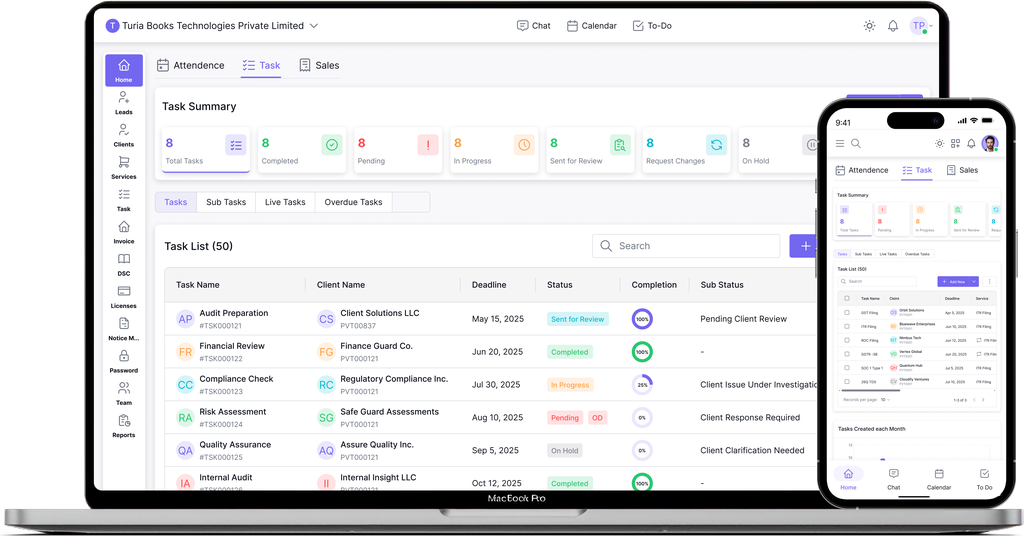
2. Recurring tasks and a shared view of filing status
GST returns, TDS filings, and ROC compliance recur automatically on their own schedule inside task management, with a running filing history and tasks assigned to named team members so ownership is never in doubt.
3. Reminders so deadlines don't slip
Email and WhatsApp reminders tied to upcoming due dates, alerts flagging overdue tasks, and separate schedules per client so different filing calendars don't get mixed up.
4. A shared Notice Board for escalations
Rather than a separate risk-prediction tool, the Notice Board flags tasks at risk of running late and circulates firm-wide reminders about upcoming deadline clusters, like GST return season.
5. Organized document management
Documents kept organized by client, service, and year, access controlled by user role, and past filings found quickly instead of digging through folders.
Document handling now organizes files by client, service, and year, with access controlled by role. MRO & Associates describes this as a meaningful cut in the time staff spent hunting for documents, which meant client queries got answered faster and with fewer follow-up emails.
The Rollout Happened in a Sequence, Not All at Once
MRO & Associates didn't adopt everything at once. The Client Portal and recurring tasks came first, since those solved the most visible daily friction, chasing documents and losing track of filing status. Reminders and the Notice Board layered on once the team was comfortable with the core workflow, and document organization followed as the volume of filings made manual folder-hunting genuinely painful.
That order matters more than it might seem. Firms that try to configure every module on day one, reminders, notice board, document rules, recurring task templates for every service line, often end up overwhelmed before the team has built a habit around the basics. A more reliable path is to fix the single biggest daily irritation first, let that become routine, and expand from there.
500s of CA firms use Turia Practice every day












Independently reviewed by CA firms using Turia:
Related Feature
Firms managing frequent regulatory notices alongside routine filings may also want notice management software as a complementary add-on.
The Future of CA Practice Is Proactive, Not Reactive
The challenges CA firms face today demand a smarter approach to compliance, workflow management, and client collaboration. As seen with MRO & Associates, a structured system like Turia can change how a firm operates day to day, fewer scattered threads, clearer ownership of filings, and a documented history to fall back on.
Frequently Asked Questions
Is Turia's compliance tracking a separate product?
No. Compliance workflows in Turia run on the same task management module used for every other client engagement, filings like GST, TDS, and ROC are set up as recurring tasks with reminders and shared status, not a standalone compliance tracker.
Does the Client Portal come with every Turia plan?
Yes. The Client Portal is included on every Turia plan, priced as a flat annual fee based on firm size, so every firm can give clients a shared space to upload documents and track task status.
What kind of reminders does Turia send for compliance deadlines?
Turia sends task-based reminders by email and WhatsApp, and broader automation and workflow features, all included on every Turia plan rather than gated to a higher tier.
How long does it take a firm like MRO & Associates to get started on Turia?
Onboarding typically takes a few days to about a week, depending on how many clients and services need to be set up. Turia also offers a 7-day free trial with no credit card required.
Does Turia generate invoices automatically for compliance work?
No. Invoices in Turia are built from the service/invoice workflow, a pro forma is created, billable items are added as work is done, and a final invoice is generated when the engagement is ready to be billed. Nothing is auto-generated without firm input.
Is MRO & Associates a real Turia customer?
Yes. MRO & Associates is a real CA firm using Turia in Pune. This case study reflects how the firm set up compliance tracking, the Client Portal, and document management in Turia.
How does Turia's compliance tracking connect to billing?
Compliance tasks and the services they belong to can feed into Turia's invoicing workflow, so completed statutory work can be turned into a proforma and then a final invoice without re-entering the same details in a separate billing tool.
Related Articles
10 Problems CA Practice Management Software Can Solve
Missed deadlines, workload gaps, and document follow-ups — the 10 operational problems practice management software fixes.
CA Practice Management Software in India: Industry Report 2026
How the market evolved from standalone billing tools to connected, WhatsApp-aware platforms, and where it's heading next.
Move From Manual Firefighting to Organized Compliance
Start a 7-day free trial, no credit card required, and see it against your own client list.